The last release allowed realm owners to set a color theme based on six seed colors. However, the lack of granular control turned out to be too limiting.
Over the last two months, I’ve worked to organize many years of arbitrary color use into a comprehensive, structured set of semantic color tokens.
And now, themes are no longer just for realm owners.
Let’s welcome custom themes!
Features
Custom themes
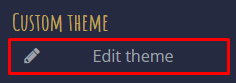
Under Player Settings (the cog-icon next to Logout), click Edit theme:
This opens the Custom theme page, which lists all available theme tokens. Clicking a token displays an input field where you can enter a custom web color code for that token:
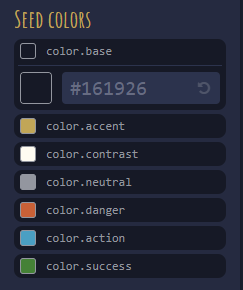
The Preview checkbox applies the theme while you edit it.
Saving, exporting, and importing themes
At the bottom of the page are three buttons: Save, Import, and Export.
- Save theme - stores any changes you have made locally in your browser.
- Import theme (import icon) - opens a file selector, where you can select a previously exported theme.
- Export theme (export icon) - generates and downloads the theme as a theme JSON file.
To reuse your custom theme on another device or browser, transfer the exported file to that device and import it under Player Settings → Custom theme.
Realm themes
Realm owners can use an exported theme file as the realm’s default theme.
- Go to the Realm settings page under Mucklet Account – Realms.
- Click Import theme in the Color theme section.
- Select a previously exported JSON theme file.
- Click Save changes at the bottom of the page.
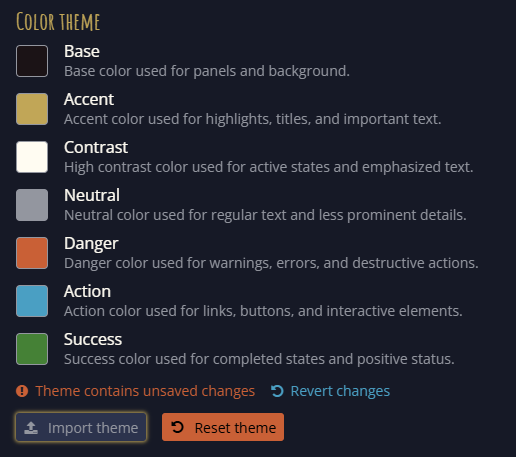
The Reset theme button reverts the theme to Mucklet’s default without saving it. You must click Save changes for the changes to take effect.
Note
It is no longer possible to edit a theme directly under Mucklet Account. The seed colors displayed on the Realm settings page are only a preview.
Theme token inheritance
There are currently 243 tokens in total, but almost all colors are derived directly or indirectly from the initial seven Seed colors.
Example:
color.accent → color.accent.300 → content.accent.fg → badge.title.fg
| Token | Description |
|---|---|
color.accent |
Accent seed color used for highlights, titles, and important text. |
color.accent.300 |
A variant of the accent color. Higher numbers are brighter in dark mode. |
content.accent.fg |
The color used for accent content, such as text or icons. |
badge.title.fg |
Used for titles in badge components, such as the exit name on the Room Info page. |
There is currently no comprehensive description of the tokens, but you can identify the token to set by using your browser’s DevTools to inspect the CSS:
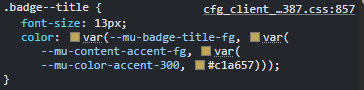
Remove the --mu- prefix and replace hyphens (-) with dots (.) to get the token name.
Improvements
UI changes
In order to create a structured set of theme tokens, some components and indicators have been updated. Below are a few of the most prominent changes.
Unread mail indicator
Unread mail is now marked with a dot using the same color (status.danger.fg) as the unread counter marker.
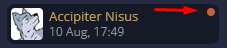
The same dot is also used for:
- Unassigned reports (moderators)
- Unassigned help requests (helpers)
- Pending incoming ownership requests
Puppet indicator
Puppets are now marked with a dot using the status.warning.bg color:

This dot appears on the Character Select, Awake, and Room Info pages.
In the About Character dialog, opened by clicking a puppet in the Awake list, and on the Character Info page when viewing a puppet, the same colored dot is displayed alongside information about who is currently controlling the puppet:

Or, when no one is controlling the puppet:

Looking For Roleplay indicator
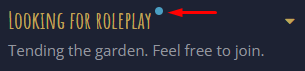
While Looking for roleplay already used an indicator dot, now set to the status.info.bg color, the same dot has been added to the About Character dialog and the Character Info page to clarify its meaning:
Scrollbar thumb color
The scrollbar thumb color is now consistent throughout the app, using either the scrollbar.thumb.bg or simplebar.thumb.bg token depending on the component.
Improved access token refresh
The access token, which the browser uses to identify the logged-in user to the server, is now refreshed periodically before it expires instead of only being checked and refreshed at login.
GitHub issue #504 – Improve access token refresh
PKCE for OAuth2
The realm now uses PKCE (Proof Key for Code Exchange) during login for improved security.
Fixes
IPv6 connections translated to internal IPv4
All connections using IPv6 were translated to an internal IPv4 address before reaching the server. This caused all accounts using IPv6 to appear as though they were connecting from the same IP address.
This has been fixed, and the database has been cleared of all internal IPv4 addresses.
About Character avatar appeared clickable
When clicking a character in the Awake list to open the About Character dialog, the character avatar appeared clickable because it showed a pointer cursor, even though clicking it had no effect. This has been fixed.
GitHub issue #506 – About character avatar seems clickable
Navigation exit list did not render correctly
When no area map was available, the navigation exit list, opened by clicking the center icon of the navigation wheel, was still rendered directly below the wheel. This caused it to be cropped.
Thanks to @Kredden for reporting it in this thread and for @Vernon_Otter to report it in this thread. As a thanks to @GreenReaper for the analysis!
GitHub issue #508 – Navigation exit list not rendering correctly
Character switching while editing an exit lost keyword changes
When editing an exit’s keywords, unsaved changes were not preserved after switching between controlled characters. This has been fixed.
Thanks to @GreenReaper for reporting it on GitHub!
GitHub issue #462 – Character switch while editing exit loses keyword changes
Room Info tools did not appear after an ownership change
When a character gained ownership of a room while inside it, the toolbar on the Room Info page did not appear as expected. This has been fixed.
Thanks again to @GreenReaper for reporting it on GitHub!
GitHub issue #459 – Inconsistent Room Info tool handling on room ownership mutation