Orchestration of what? Of realms!
For me, it has been a lot of work, and one big step closer to my vision for the game. But apart from this, the release also brings a handful of new script features.
Let’s have a look, shall we?
Features
Realm orchestration
Enabling automatic setup of new realms, allowing realm owners to update to new releases, to restart the world when it is acting up, or to restore to a backup; those are the type of things that I want Realm orchestration to enable.
While you might not see much of it right now, I may share a few screenshots of the GUI:
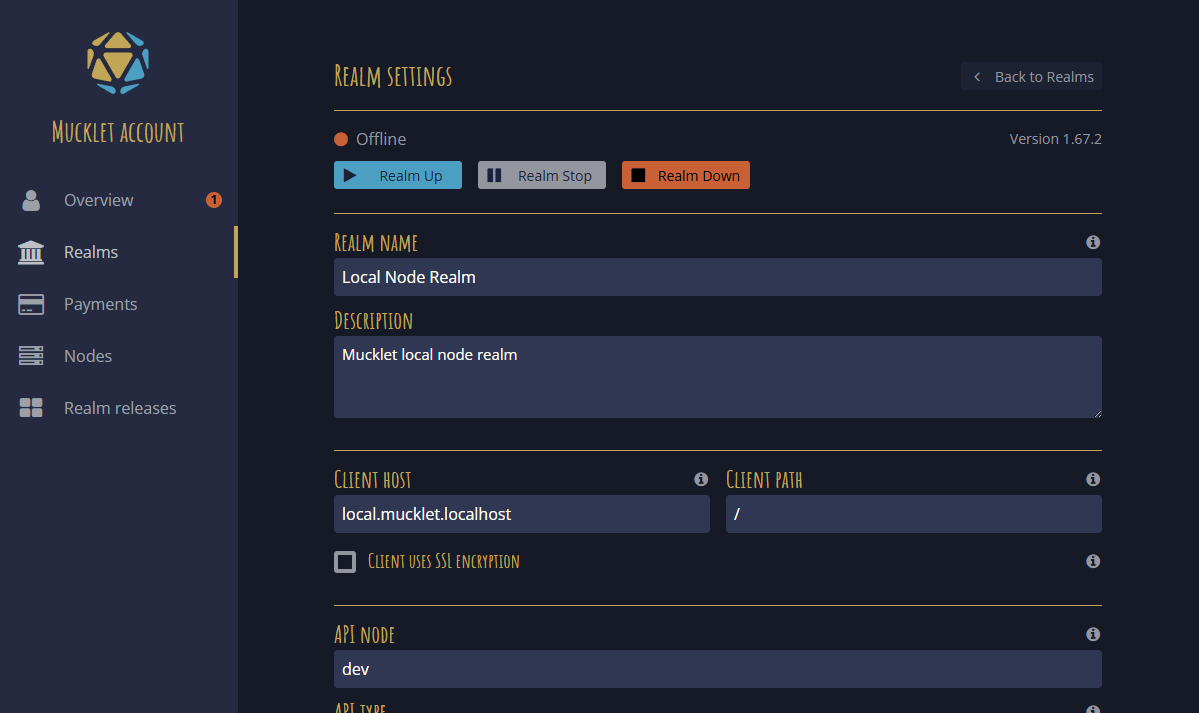


GitHub issue #409 - Manage realms
Scripting
Request/response
It is now possible for scripts to send synchronous requests to other scripts. The sending script will wait for a response (or timeout) before continuing its execution.
Sender
const response = Script.request(destAddr, "myTopic", JSON.stringify("foo"))
if (!response.isError()) {
    console.log(response.parseResult<string>()) // "bar"
}
Receiver
export function onRequest(addr: string, request: Request): void {
    if (request.topic == "myTopic") {
        console.log(request.parseData<string>()) // "foo"
        request.reply(JSON.stringify("bar"))
    }
}
For a full example, see the new VIP list and VIP guard examples in Mucklet Script - Script examples.
Thanks to @farcaller for making me scrap my attempt at asynchronous requests, in favor of the more useful synchronous approach!
VIP script examples
Two new example scripts that interact with one another have been added to the Mucklet Script Documentation - Script examples.
| Script file | Description |
|---|---|
| vip_list.ts | A script that manages a list of VIP characters, requested by another room running the vip_guard.ts script. |
| vip_guard.ts | A script that prevents characters from using an exit unless they are listed as VIP characters by the vip_list.ts script. |
List room profiles
It is now possible for scripts to list room profiles, using the Room.profileIterator:
const iter = Room.profileIterator()
for (const iter = Room.profileIterator(); iter.isValid(); iter.next()) {
    const profile = iter.getProfile()
    Room.describe(`Profile "${profile.key}": ${profile.name}`)
}
Script broadcast
Scripts may now use Script.broadcast to broadcast a post message to all scripts listening specifically to the broadcasting script:
Script.broadcast("myTopic", JSON.stringify("foo"))
As a special case, scripts in the same room that listens to any script posts, will also receive the broadcast. Listening scripts will receive the broadcast through the onMessage entry point.
Info formatting for script info
The info event sent to the client on CmdAction.info may now use info formatting, including headers and tables, as described in the info formatting help section:
help format info
GitHub issue #419 - Info formatting for script info
Restricted and unlisted commands
Custom room commands may now be flagged as restricted and/or unlisted, using Command.setRestricted and Command.setUnlisted:
Room.addCommand("myRestricted",
    new Command("my restricted action", "A restricted action.").setRestricted()
)
Room.addCommand("myUnlisted",
    new Command("my unlisted action", "An unlisted action.").setUnlisted()
)
An unlisted command will not be listed in the Room info panel, but may be listed using:
list commands
A restricted command, if the player does not have edit access to the room, cannot be used and will not be listed neither in the Room info panel, nor with the list commands command.
GitHub issue #421 - Restricted and unlisted custom commands
Deactivate script if onActivate aborts
To prevent scripts from running in an half-baked state, scripts are now deactivated if it aborts during the onActivate call.
If you try to activate a script and it doesn’t get active, check the script logs for errors:
roomscript myScript
Fixes
LFRP not displaying
The LFRP description didn’t always update or show, even if a character had entered a description. This has been fixed, and LFRP description are now shown as expected.
Thanks to @Grim_Marks for reporting it in this thread!
Non-Player Logins Cannot Get tag.groups
The tag.groups and tag.group resources were not accessible when connecting to the API using bot tokens or manager tokens. This has been fixed, and the resources are now accessible as long as a valid token is used.
Thanks to @Donovan_DMC for pointing out the issue in this thread!
RangeError: Selection points outside of document
When triggering a re-render such as when switching between desktop and mobile layout, while the input console contained trailing spaces, caused the input console to stop working and an error to be logged:
RangeError: Selection points outside of document
This has been fixed.
GitHub issue #413 - RangeError: Selection points outside of document
Script getChar aborts on char not found
When calling Script.getChar or Room.getChar using a character ID that does not exist or belongs to a deleted character, the script aborted with the error:
Character not found.
This has been fixed, and the functions now return a null value instead.
Room ID of script post address not validated
When making a Script.post to another script, the room ID part of the target address was never validated. This has been fixed.
Unable to target characters outside the room with stop lead
The stop lead command only allowed targeting characters currently in the same room. This has been fixed, and it is now possible to target a specific character following you, even if they are in a different room.
Thanks to ItsAKelmi for reporting it by creating GitHub issue #407!
Banned account gets Access Denied
When a player was banned from Wolfery, the player would see an error message:
Something went wrong
An error occurred when trying to authenticate:
Access deniedTry again
This message has been replaced with a more informative message, together with a button that links back to mucklet.com:
Player banned
The moderators of this realm have decided to issue a ban. You may no longer access this world.
Go to Mucklet
The message has also been improved in case of Mucklet account bans and the player being blocked because of a recent ban putting the computer address in quarantine.
GitHub issue #424 - Banned account shows Access Denied
Misaligned character tab hotkeys
When using the Ctrl + 12 … 90 hotkeys to switch between active characters, the numbers wasn’t aligned with the order the characters were displayed. Additionally, Shift + Tab did not cycle between characters in the displayed order. This has been fixed.
Thanks to @Yule for reporting the issue in this thread!
GitHub issue #426 - Character tab hotkeys are misaligned
Debug logging for invalid_request login error
While not yet solved, debug logging has been added in an attempt to pin down the issue regarding the invalid_request error that appears for some players during login.
Sorry, @WinterFloof , for not yet having solved the issue you reported in this thread.