Hey folks.
I started on these scripts a long time ago and finally got around to getting them in a good state.
What these scripts do is swap between room profiles using a rule set to simulate weather. They also include ambience similar to the example script but the messages reflect the current weather.
The reason there’s two scripts is if you want multiple rooms to have the same weather. The weather_controller will control the weather in one room and the one or more weather_listener in other rooms will update the weather there.
Commands
Both scripts add these commands:
weather on / weather off : On the controller it stops the simulation. On the listener it stops syncing the weather and disables the weather set command.
ambience on / ambience off : Stops the ambience messages.
weather set <keyword> : On the controller it changes the weather. On the listener it sends a request to the controller to change the weather.
Setup
I’ve tried to make this as friendly as possible to configure but right now the scripts are semi-hard-coded to use the profiles: sunny, foggy, rainy, stormy, and damp.
Controller Config
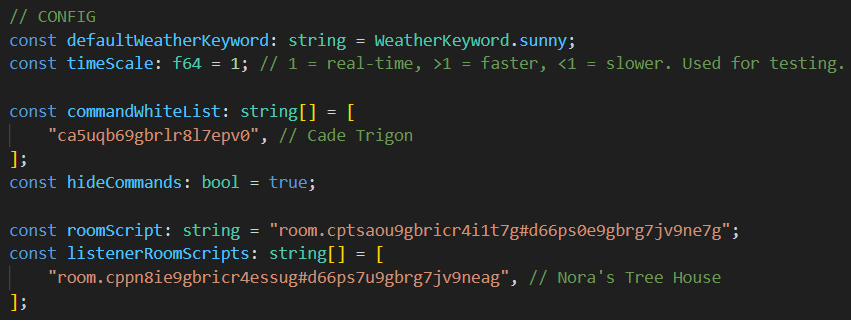
roomScript : Change this to the address of the controller script itself (I don’t know why but I had to let it accept messages from itself)listenerRoomScripts : Change this to the addresses of any listener scripts you want it to communicate with.commandWhiteList : Add the IDs of any friends’ characters you want to allow to use the commands.The other variables I think are self explanatory.
Listener Config
controllerRoomScript : Change this to the address of the controller you want it to communicate with.
Weather Config
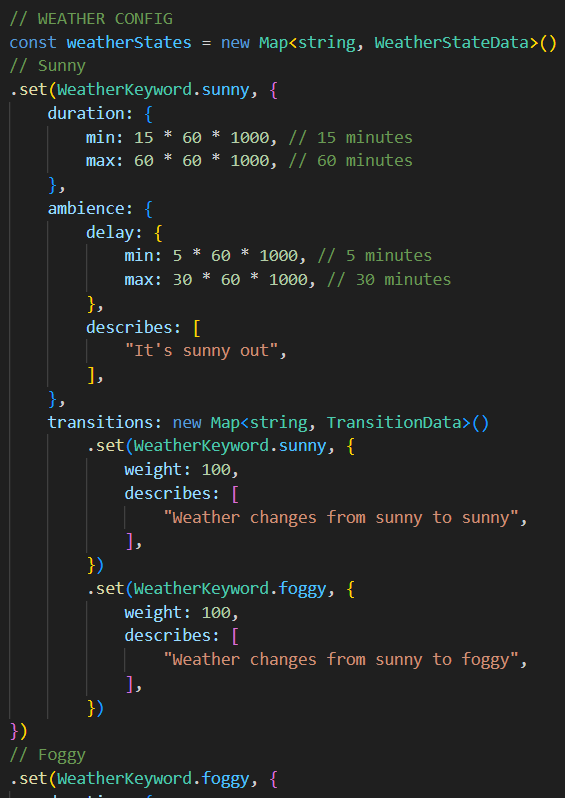
This is the big one.
weatherStates contains the rules the controller uses to decide which weather state to change to and all of the describe messages for when the weather changes and for the ambience.
duration : The range of time that weather state will stay for.
ambience : Contains the delay between describes. If you don’t want ambience for this weather state you can live the list empty.
transitions : Contains the weather states the current weather state can change to. (Ex. sunny can change to sunny or foggy. foggy can change back to sunny or to rainy or stormy) Each transition has a weight. So, the higher the weight of one transition is over the others the greater the chance it will be picked. There’s also describes for the transitions if you want to describe the weather changing.
Closing
Any feedback or recommendations are welcome.
I’m working on making a different version of these scripts that centralizes the basic config and the logic. So, folks can make a script for each of their rooms in VS Code with hopefully less headache but would mean uploading with the API.